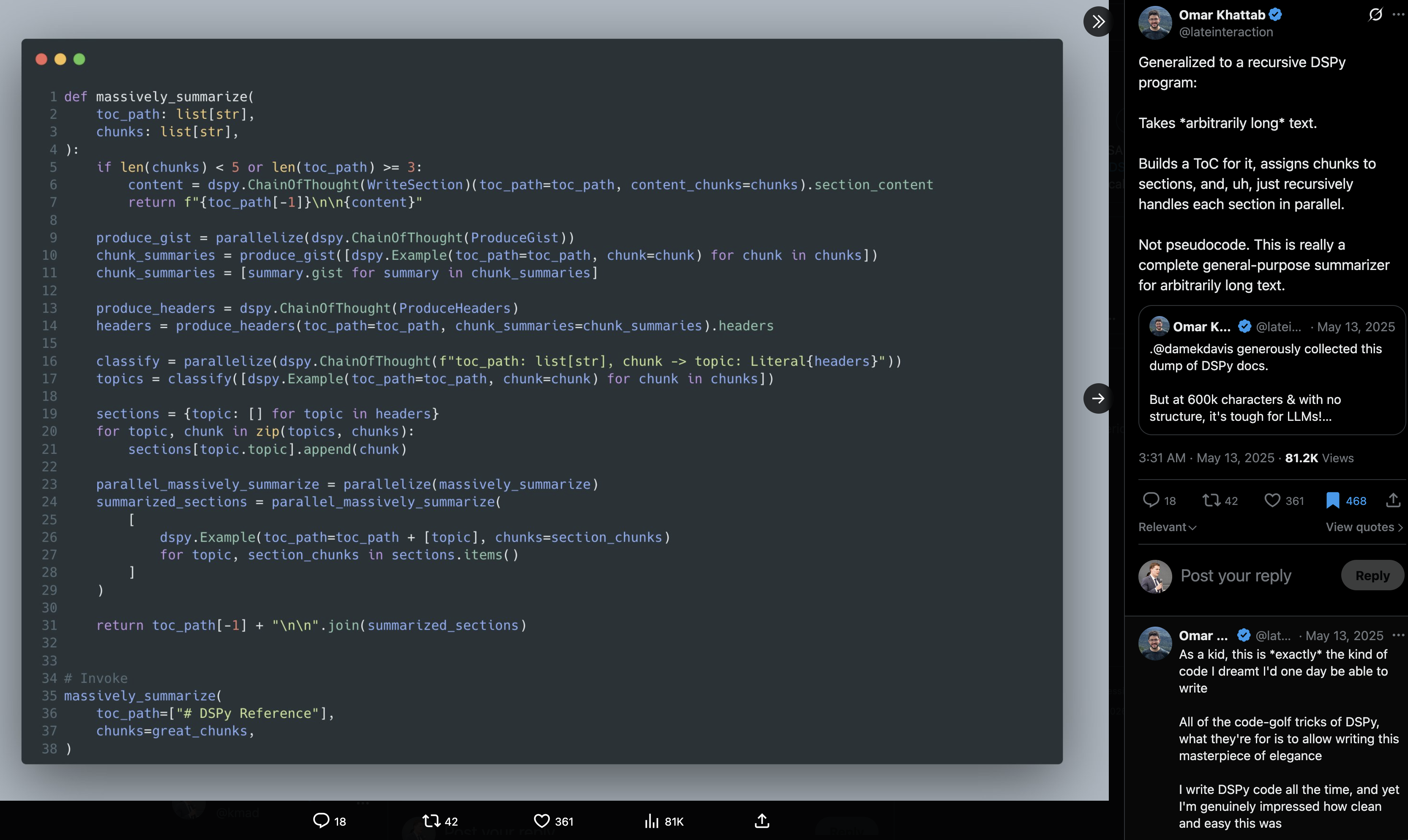
Omar Khattab, May 2025 — a general-purpose summarizer for arbitrarily long text as a recursive DSPy program. The RLM idea, in ~40 lines.
01 · Foundations · the result
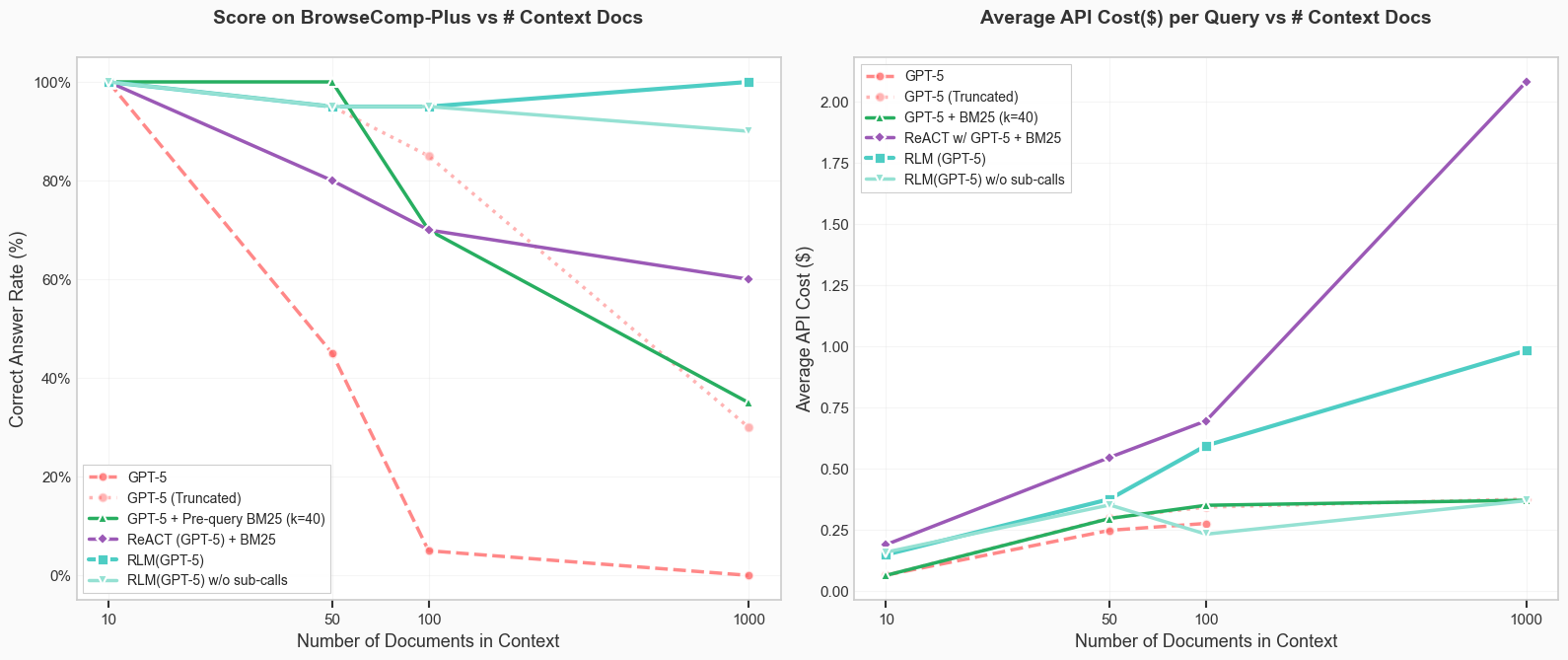
On BrowseComp-Plus, RLM(GPT-5) stays near 100% out to 1000 docs while flat, truncation, RAG, and ReAct all decay — at a fraction of ReAct's cost.
01 · Foundations
You define the task, the model picks the path.
With agents and tool-calling, you are subject to limits of the context window.
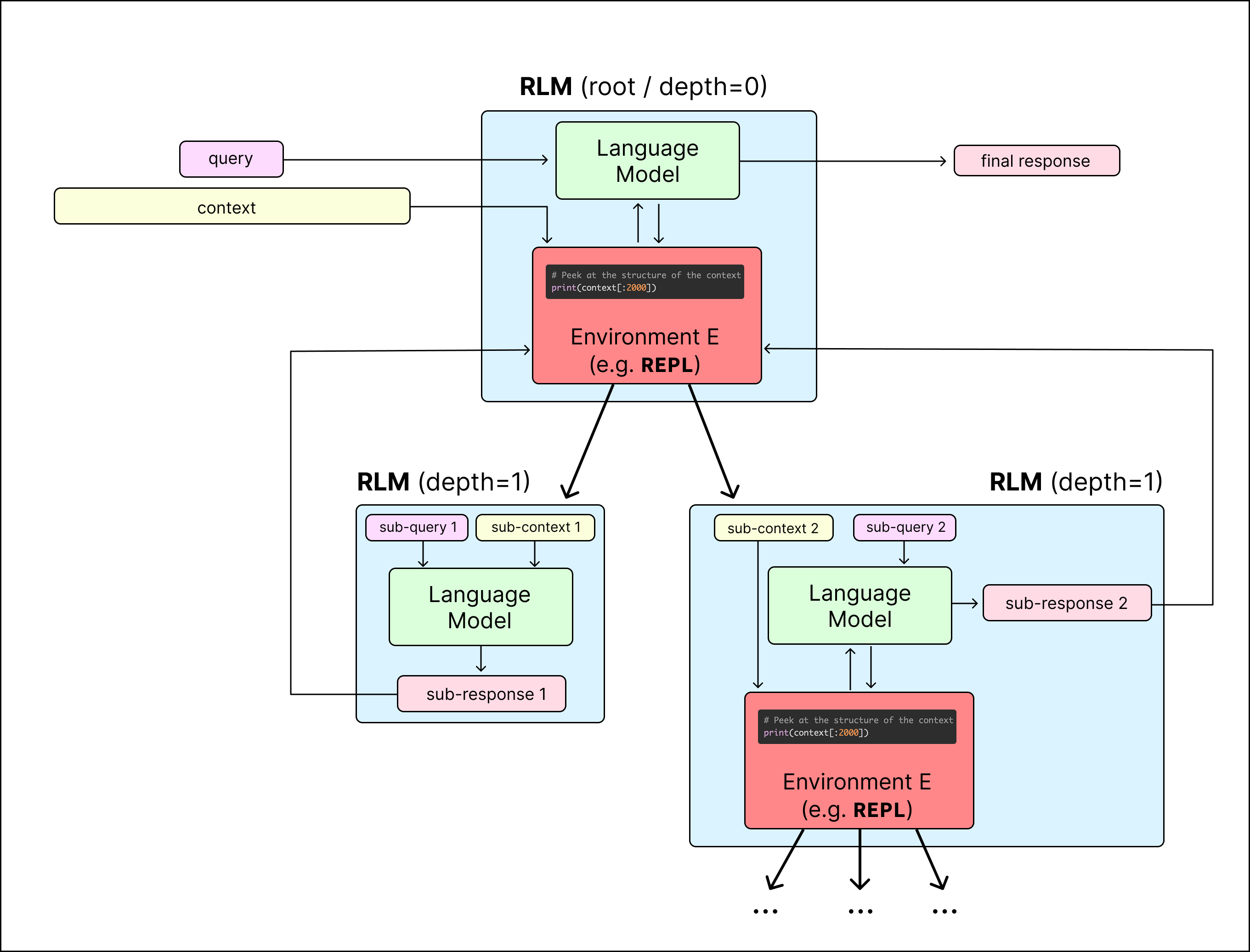
With an RLM the model decides how to navigate the context — peek, grep, chunk, recurse — inside the REPL.
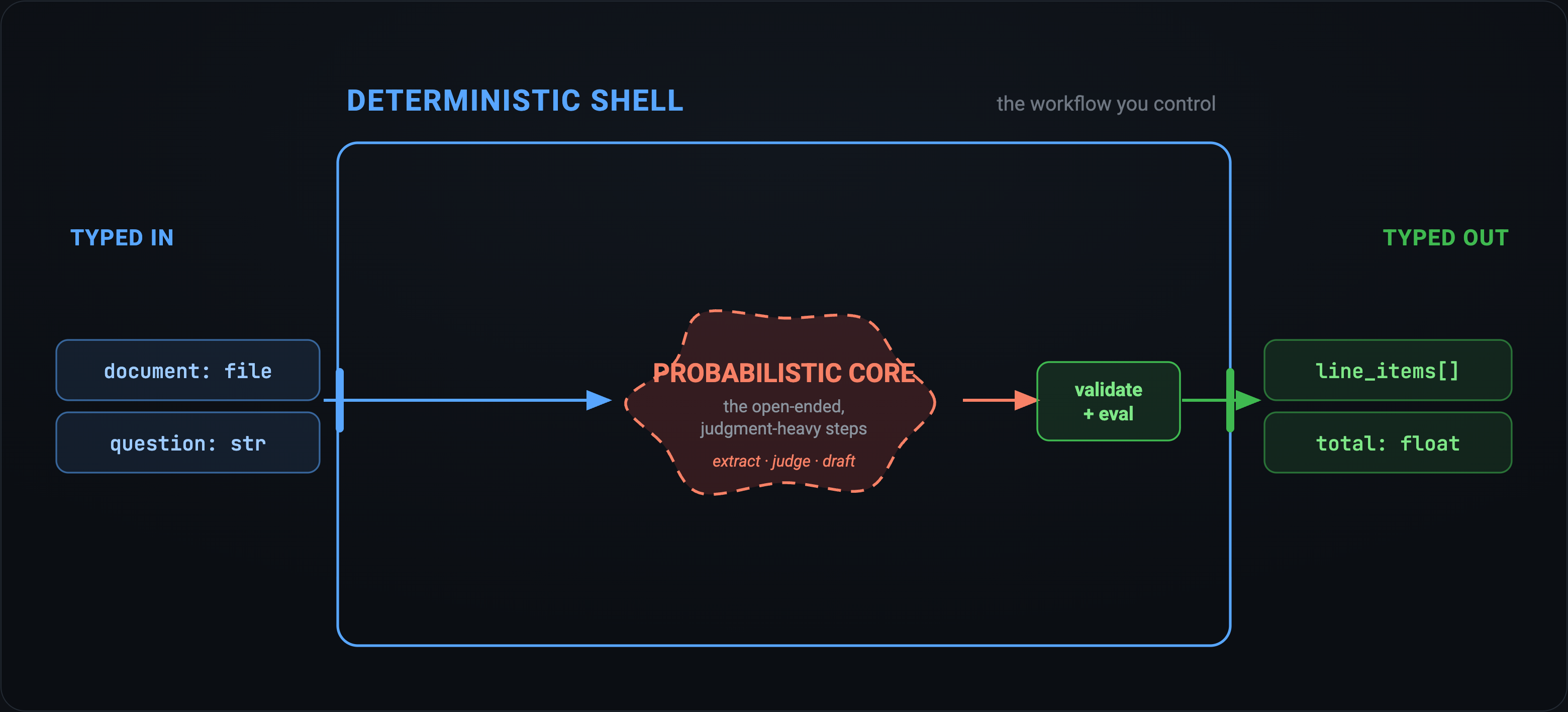
The deterministic shell is yours. The open-ended, judgment-heavy middle is the model's job.
01 · Foundations
Meaningfully different from tool-calling; context is part of the environment.
Approach
How it treats context
RAG
Retrieves top‑k passages for a single query.
Agents
Decompose task — pollute root context with every sub-result.
CodeAct
Runs code as a tool, not as the environment itself.
RLM
The code is the environment; recursion is the primitive.
The first three stuff the context window. An RLM keeps the context as a variable in the environment — the root LM never "sees" the bulk; it orchestrates via code.
Context window · what the model actually sees
→ or Space to step through
01 · Foundations · where results live
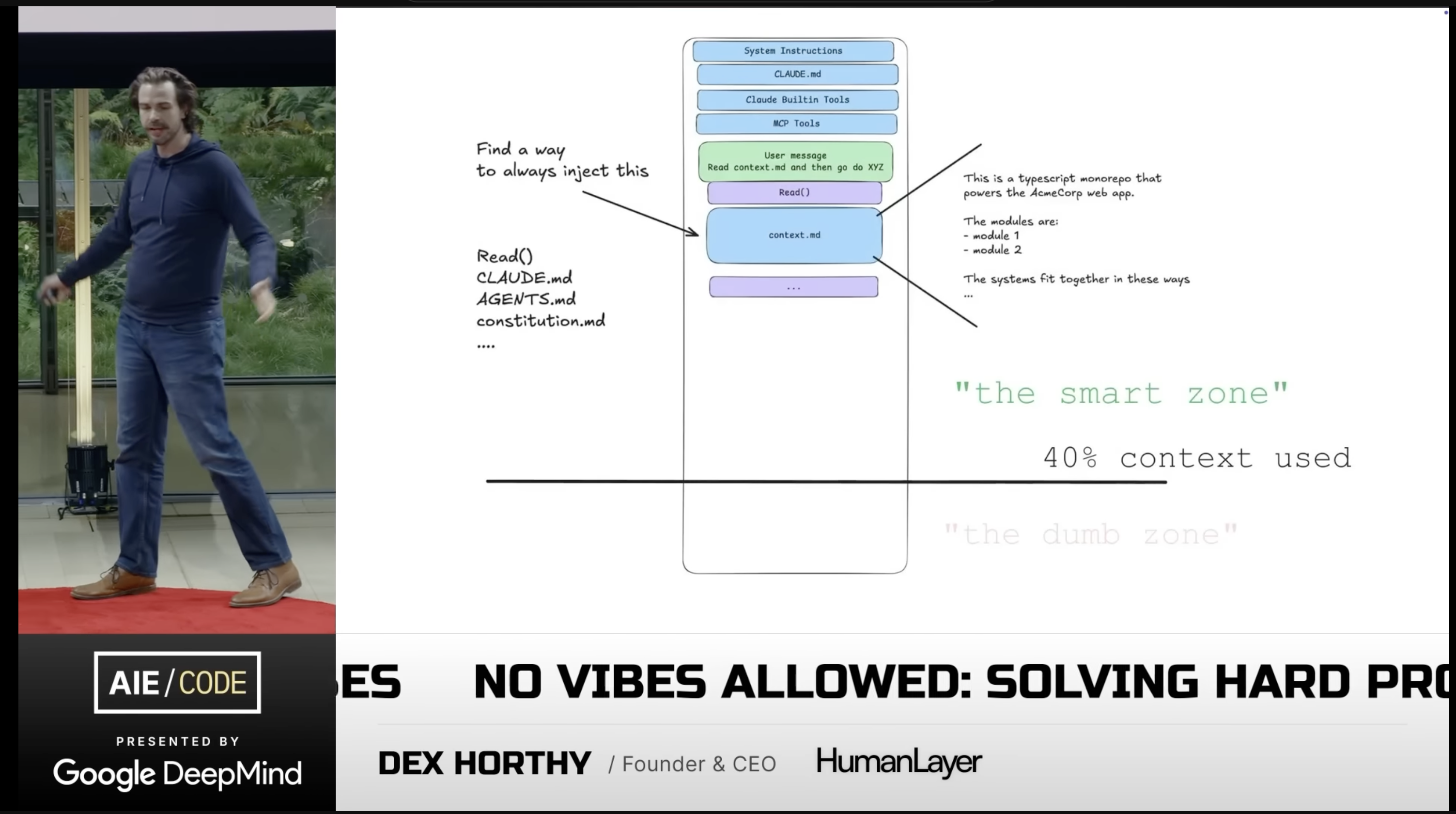
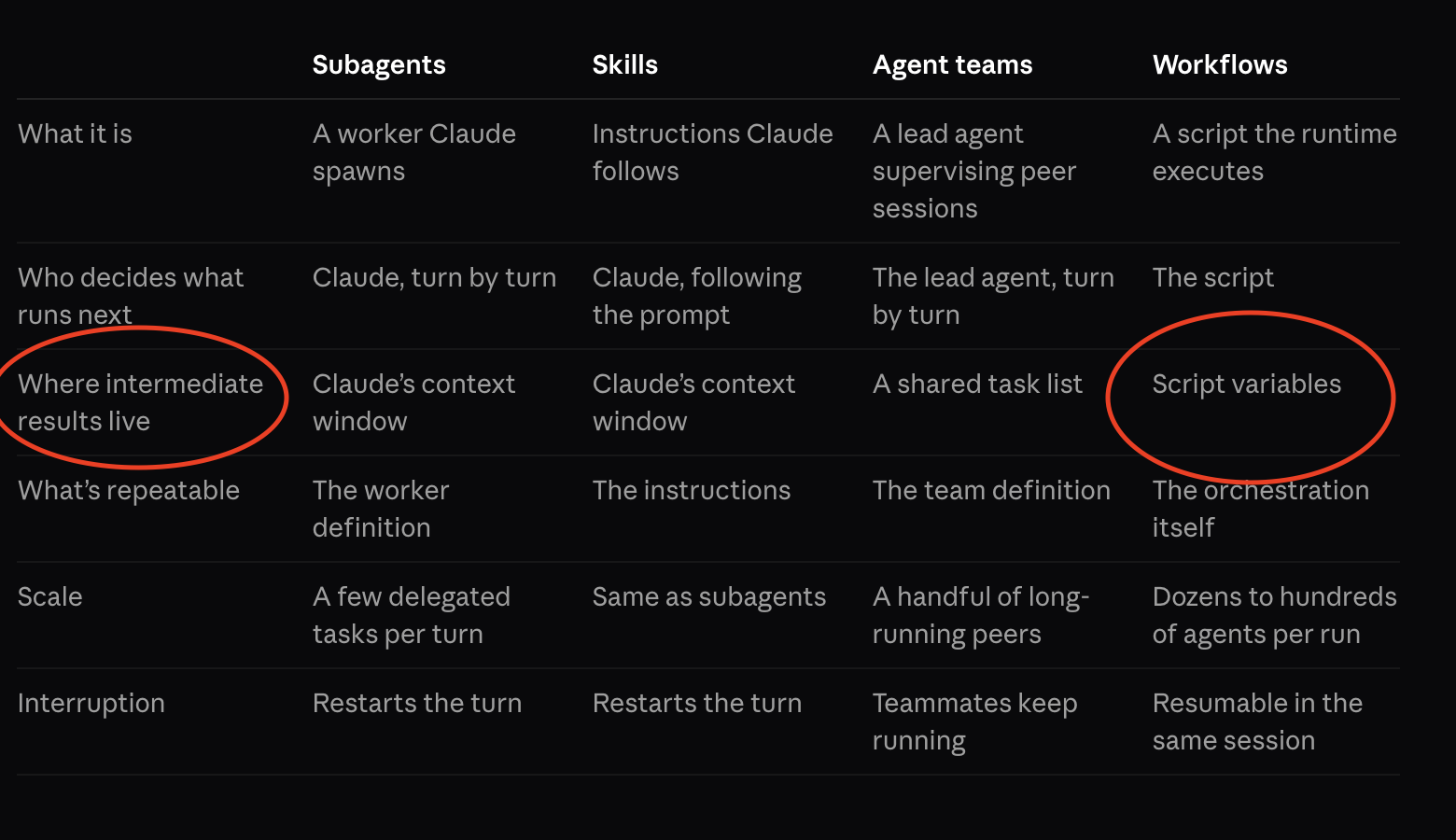
Only workflows keep intermediate results in script variables — state that outlives any one context window. Sounds familiar!
02
When to reach for it.
02 · Fit
Rule of thumb.
Use an RLM when the context won't fit or the work is compositional — and you can spend latency to buy reliability.
Otherwise a single call, RAG, or a plain code tool is cheaper and just as good.
02 · Fit
When to use
Use it
Very large/ dense inputs or outputs
Tasks amenable to decomposition
Long-horizon sessionsthat would rot a flat context
Skip it
Fits in context
Low-latency requirements
~Weak base coder
02 · benchmark · LongCoT
LongCoT Performance
@raw_works stress-tested long-horizon reasoning using claude-sonnet-4-5vanilla vs dspy.RLM
Across 500 questions (logic, CS, chemistry, chess, and math): RLM lifted accuracy from 2.6% → 45.4%
RLM wins where dependencies compile to code — puzzles, Hanoi, chess. It stalls on graph-shaped problems (max-flow, Hindley–Milner) and graphs.
Same root model (gpt-5.4-mini), same question. flat dumps the whole blob into one prompt; RLM loads it as a sandbox variable and counts in code.
Complexitypeak prompt tok ↓
flat19,556
rlm1,253
15.6× smaller blob per call
Performanceaccuracy ↑
flat0%
rlm100%
right vs wrong — flat miscounts
Times / question ↓
flat4.2s
rlm5.9s
flat 1.4× faster — and wrong
Token usagetotal tok ↓
flat19,572
rlm3,869
5.1× fewer tokens billed
flat 0/1 correct · RLM 1/1 — RLM trades 1.4× wall-clock for a 15× smaller prompt, 5× fewer tokens, and the right answer.
03 · measured · flat vs RLM
Five questions over a 5k-row table.
Joins, group-bys, churn math. flat flattens df.to_string() into the prompt (truncated); RLM reads only a preview, then runs real pandas in the sandbox.
Complexitypeak prompt tok ↓
flat3,821
rlm1,191
3.2× smaller — frame stays out
Performanceaccuracy ↑
flat0%
rlm75%
3/4 vs 0/4 — truncation loses rows
Times / question ↓
flat0.9s
rlm6.6s
flat 7× faster — the cost of the loop
Token usagetotal tok ↓
flat3,840
rlm2,488
1.5× fewer even with the sandbox loop
The honest trade: RLM is slower per question, but the only arm that actually computes over the data — flat truncates and guesses.
03 · measured · the coding-agent question
A coding agent gets it right too. For 40–115× the overhead.
Same two tasks, same grading. agent = Claude Code — its own frontier model, its own shell, not dspy.RLM at all. Not iso-model with flat/rlm: this answers "what does buying a general-purpose agent cost instead of building the scaffold," not "which scaffold wins."
A · cost / querylong-context agg ↓
flat$0.0147
rlm$0.0041
agent$0.190
agent 46× rlm's cost — tied on accuracy
A · total tokenslong-context agg ↓
flat19,572
rlm3,933
agent146,263
agent 37× rlm's tokens per question
B · cost / queryworkbook ↓
flat$0.0013
rlm$0.0035
agent$0.189
agent 54× rlm's cost — tied on accuracy
B · total tokensworkbook ↓
flat3,837
rlm3,405
agent144,967
agent 43× rlm's tokens per question
Accuracy tied: agent 100% / 75% vs rlm 100% / 75% on tasks A/B — a real shell beats flat regardless of scaffold. The gap is pure overhead: Claude Code's own system prompt, tool schema, and full-file reads dominate every call. Building the scaffold is ~50× cheaper than buying general-purpose agent overhead, per query.
03
In practice.
03 · In practice
RLMs in the real world
dspy.RLM — the core module in DSPy. Typed signatures, pluggable sandbox.
ax(github.com/ax-llm/ax) — open source reference agent with DSPy, full workflow and orchestration.
predict-rlm(Trampoline AI) — production runtime on DSPy. Multimodal, skills, file I/O, full traces.
fast-rlm(avbiswas) — minimal; the whole thing in an afternoon.
03 · dspy.RLM
Exploring a dataframe
The whole integration is a DSPy signature — analyst brief in the docstring, typed inputs, typed outputs.
Pass the DataFrames in, call dspy.RLM(). No agent scaffold, no custom tools, no hand-built orchestration.
The model interacts with the data through REPL code. That's the entire program you write.
class CohortRetentionAnalysis(dspy.Signature):
"""You are a data analyst investigating why user retention is dropping.
You have access to three DataFrames:
- users: user profiles with signup dates and acquisition channels
- events: feature usage events with timestamps
- subscriptions: subscription status, plan, MRR, and cancellation reasons
Investigate the data step by step. Compute retention by cohort, segment by
acquisition channel, compare feature usage between retained and churned users,
and identify the root cause of churn.
"""users: DataFrame = dspy.InputField(desc="User profiles with signup_date, acquisition_channel, country")
events: DataFrame = dspy.InputField(desc="Feature usage events with user_id, event_type, timestamp")
subscriptions: DataFrame = dspy.InputField(desc="Subscription records with status, plan, mrr, cancellation_reason")
overall_churn_rate: float = dspy.OutputField(desc="Overall churn rate as a decimal (e.g. 0.25 for 25%)")
worst_channel: str = dspy.OutputField(desc="Acquisition channel with highest churn rate")
key_finding: str = dspy.OutputField(desc="The main insight about what differentiates churned users")
recommendations: str = dspy.OutputField(desc="2-3 actionable recommendations based on the analysis")
dspy.RLM(CohortRetentionAnalysis)(users=..., events=..., subscriptions=...)
03 · dspy.RLM
dspy.RLM — exploring a dataframe
Three DataFrames, 16MB / 250k events. Only previews hit the prompt — the model writes and runs the analysis in the sandbox.
Exploreshapes, dtypes, channel & plan counts
Define churncancelled / total; cohort by signup month
Segment by channelpaid_campaign_x worst, every cohort
Dig into behaviorretained vs churned feature usage
Find the signaladvanced_reports adoption
Verify & submitsanity checks, then SUBMIT(...)
7 REPL turns — two spent fixing its own KeyError on signup_month.
→ or Space to step through
Reasoningturn 1 / 7
03 · dspy.RLM · trajectory
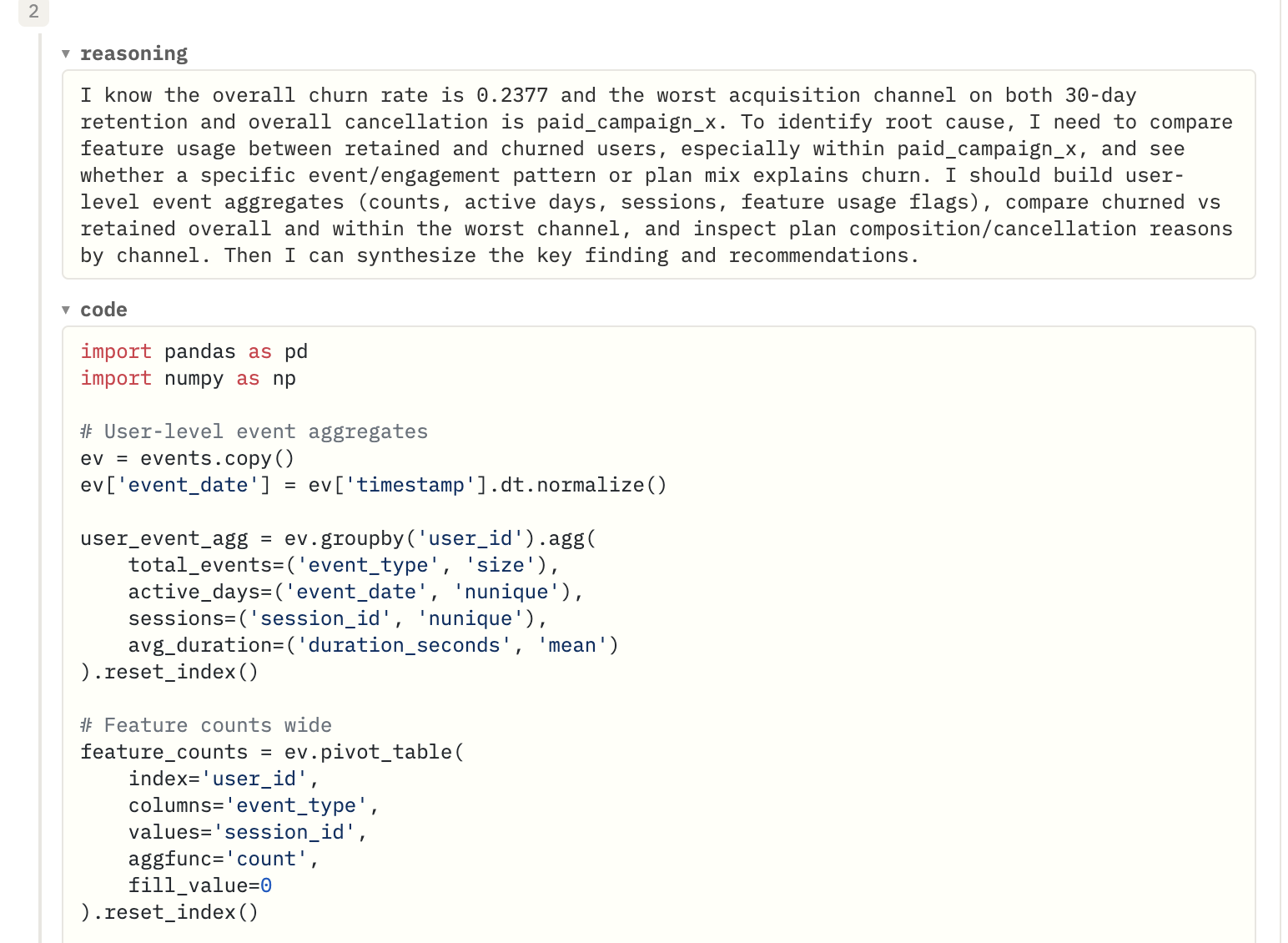
One step of the run, verbatim — the model's reasoning, then the pandas it wrote to build user-level aggregates and feature pivots. No scaffold; it planned this itself.
03 · predict-rlm · live run
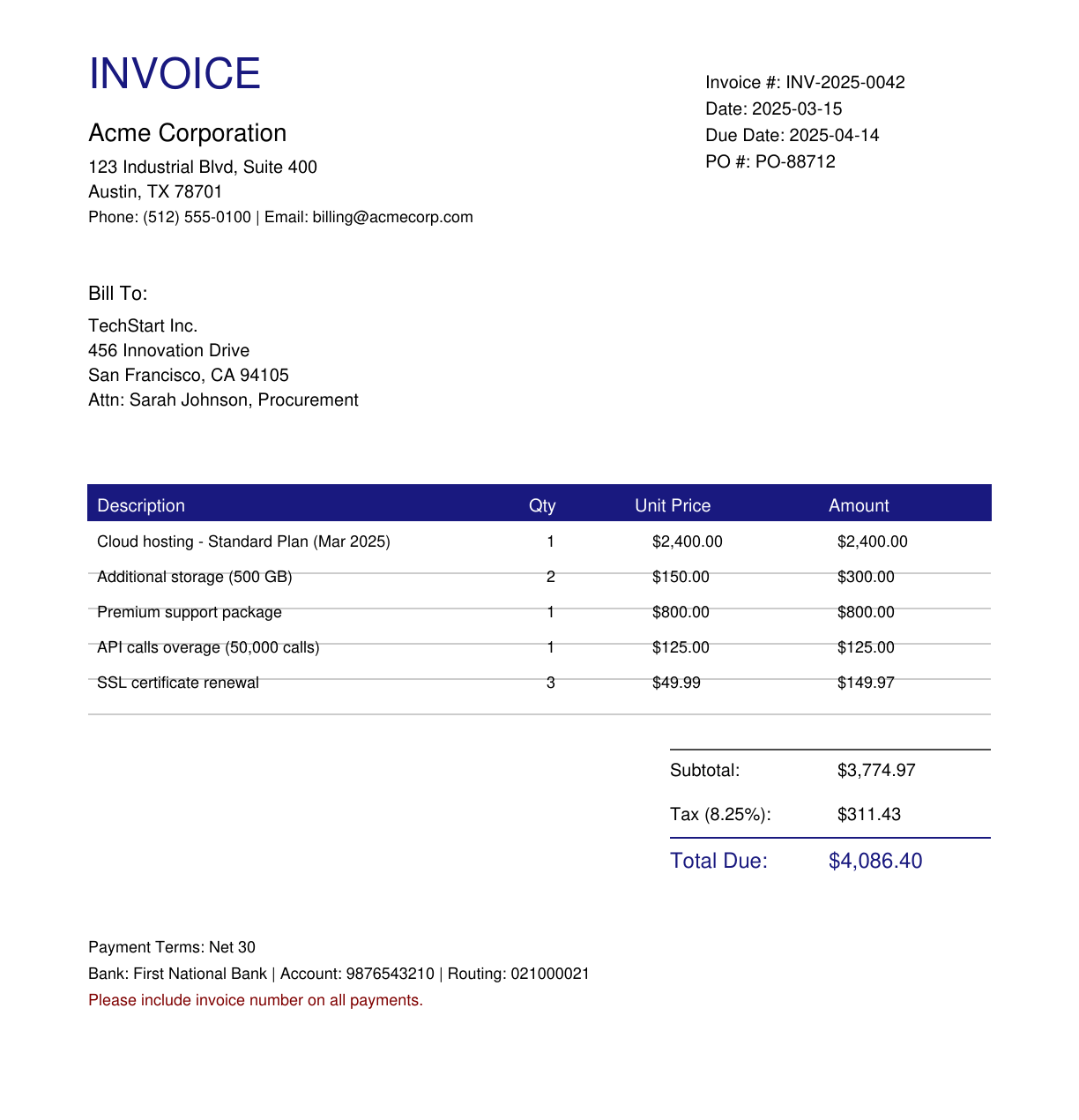
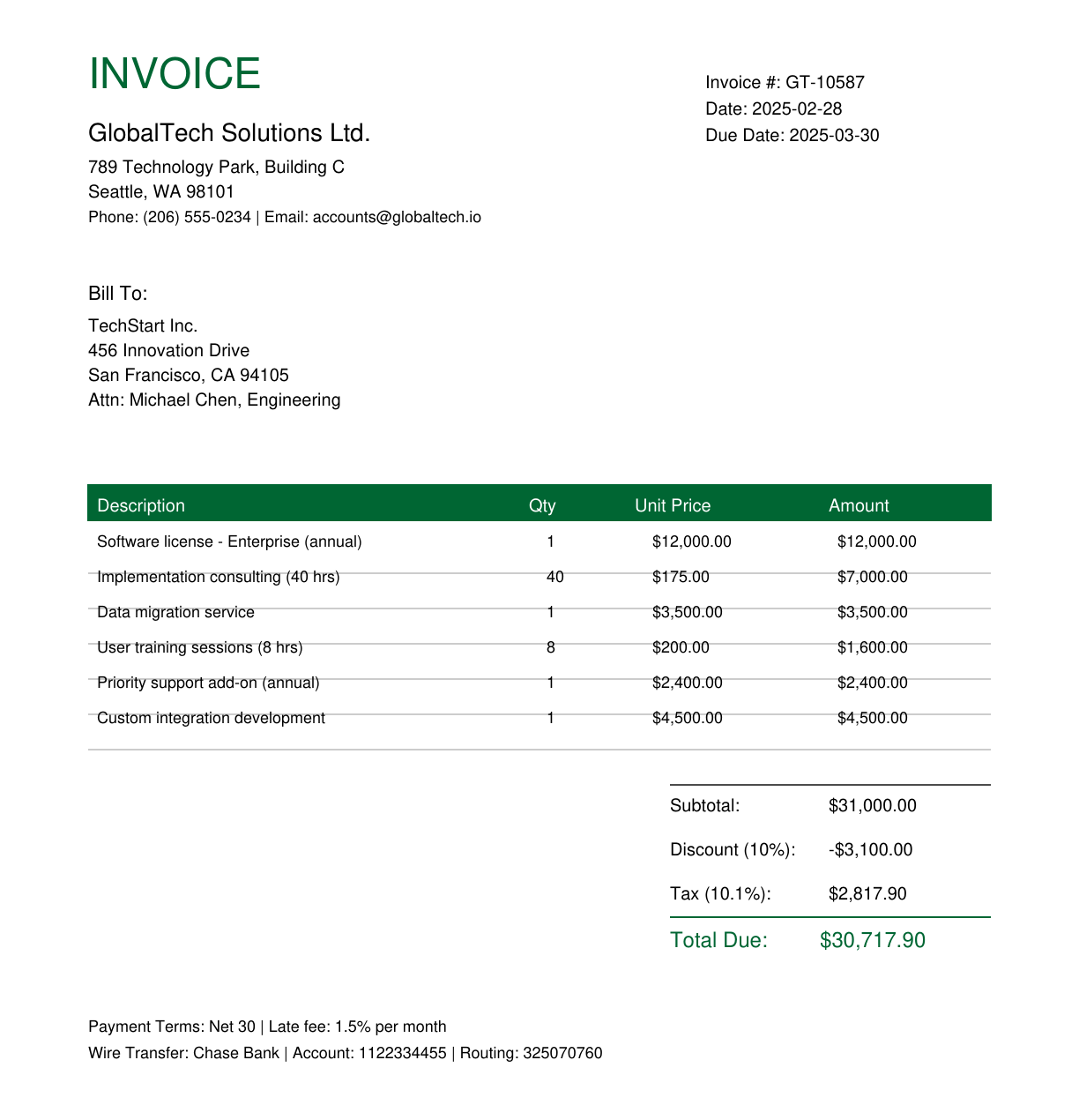
Real world use case: Invoice to inventory
2 invoice PDFs in
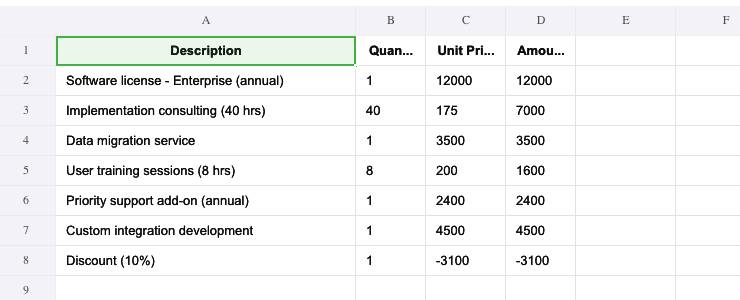
→
one .xlsx out
Two PDFs → one typed .xlsx — line items lifted straight off the page, one sheet per vendor plus a reconciled Summary. predict-rlm/examples/invoice_processing
03 · predict-rlm · the run
Focus on abstractions instead of context engineerning.
from predict_rlm import PredictRLM, File
from predict_rlm.skills import pdf, spreadsheet

rlm = PredictRLM(ProcessInvoices,
                 skills=[pdf, spreadsheet],
                 sub_lm="openai/gpt-5.1")
await rlm.acall(invoices=[File("acme.pdf"),
                              File("globaltech.pdf")])
One DSPy signature → typed InvoiceExtractionResult + an .xlsx workbook. No agent scaffold. Orchestrator gpt-5.4 drives the REPL; gpt-5.1 reads the page images.
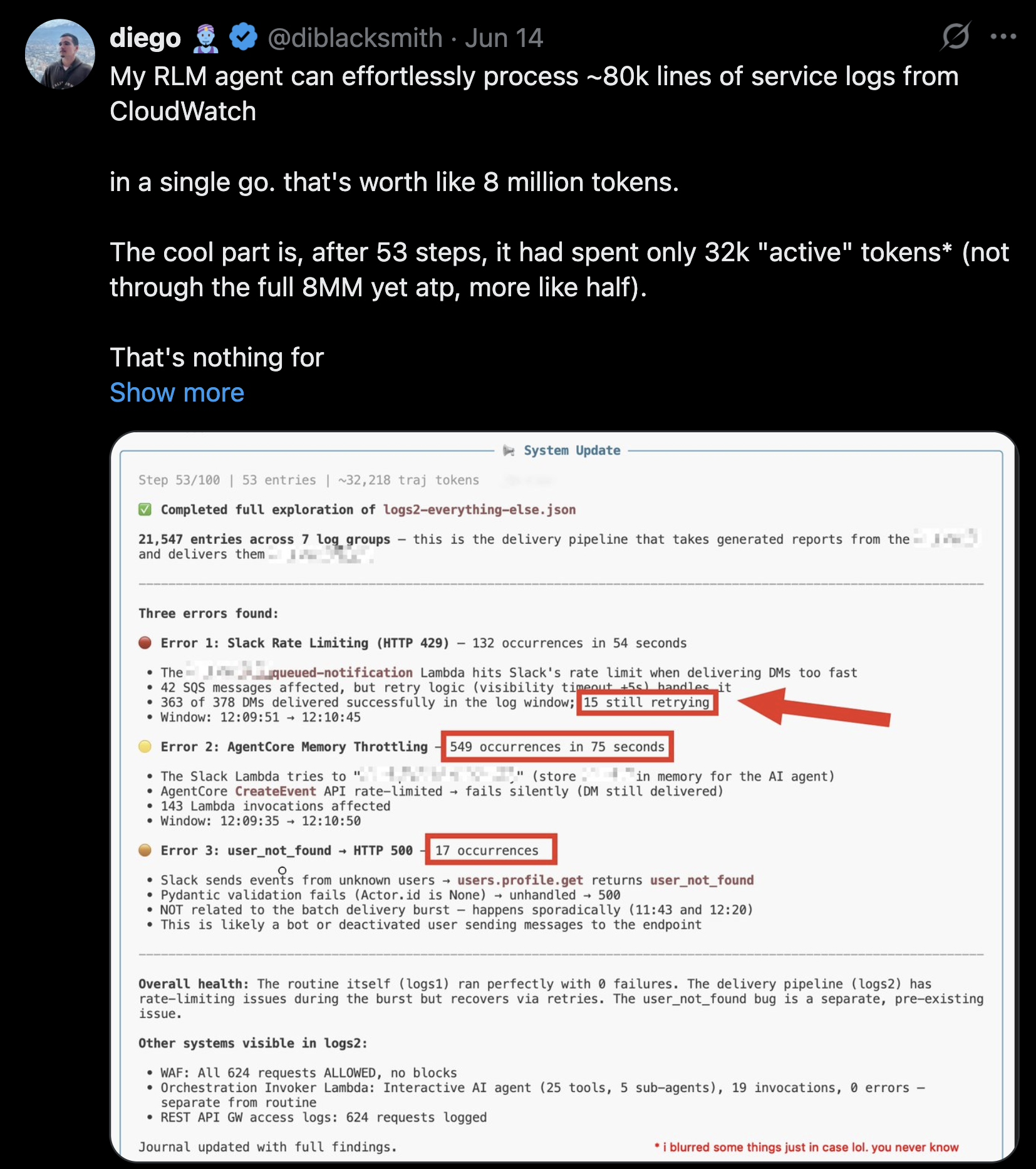
8M tokens of CloudWatch logs, ~32k active after 53 steps — the model paged through the context instead of holding it all at once.
03 · in the real world · HALO
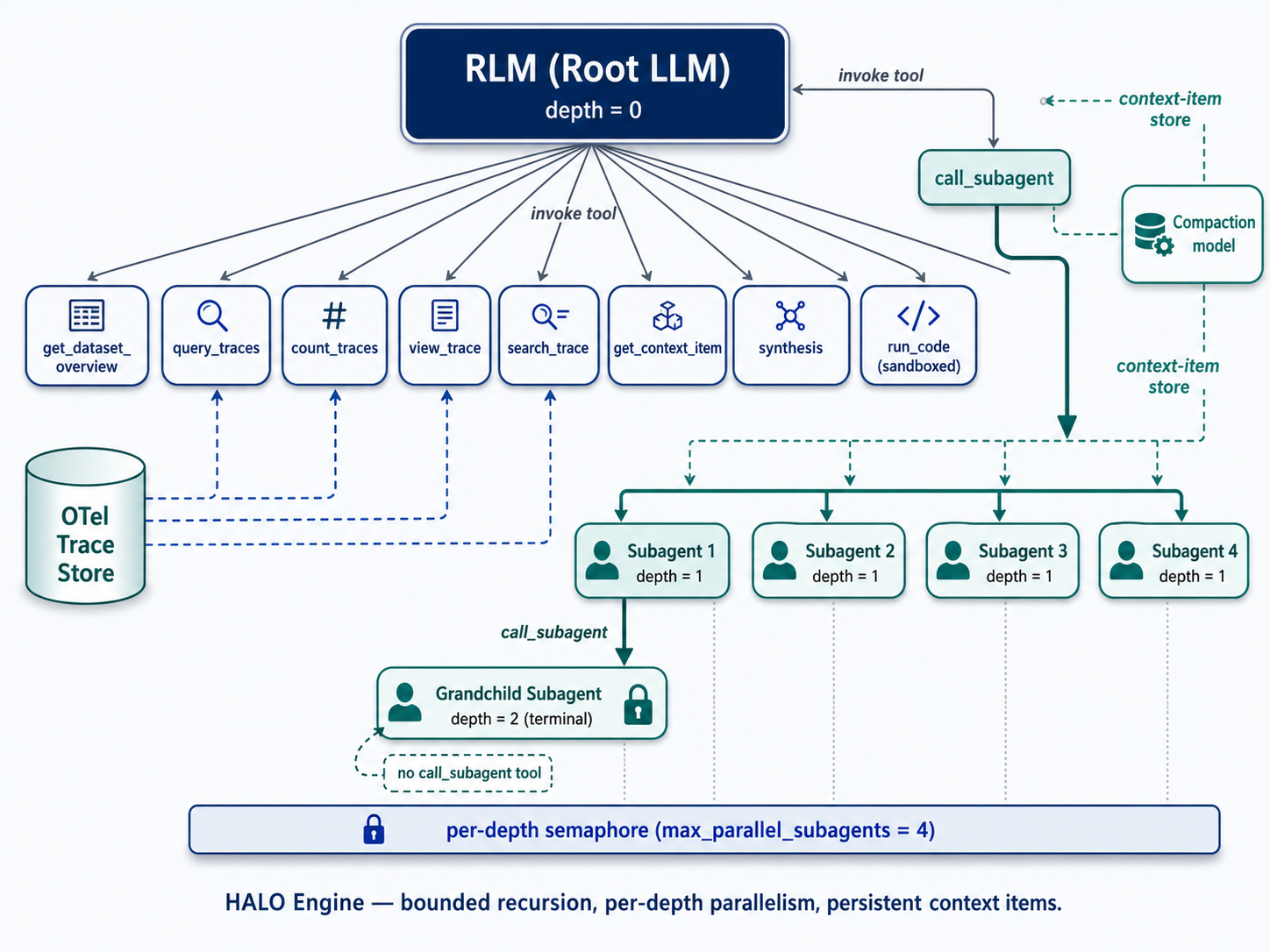
HALO(context-labs/halo) — a recursive-LM engine over OpenTelemetry traces: the root LM navigates the trace store through tools, spawns bounded per-depth-parallel subagents, and compacts findings into persistent context items.
03 · dspy.RLM · security audit
Scanning a codebase for $0.87
Pointed dspy.RLM at OWASP's Damn Vulnerable Serverless App — no prompt engineering, no custom scanner logic, just a signature.
It decomposed the tree itself, delegated file-level reads to a cheap sub-LM, and synthesized findings back up and caught 6 of 10 planted vulns.
Missed dynamic ones: auth bypass, DoS via billing abuse, TOCTOU race conditions, vulnerable dependencies.
import dspy
import os
from typing import Any
# LM Setup - must have OPENROUTER_API_KEY set
lm = dspy.LM("openrouter/moonshotai/kimi-k2.5", max_tokens=16000)
lm_mini = dspy.LM("openrouter/moonshotai/kimi-k2.5", max_tokens=16000)
dspy.configure(lm=lm)
# DSPy Signature & Programclass CodeScanner(dspy.Signature):
"""
Review the provided application source code in detail.
Focus specifically on identifying security vulnerabilities,
insecure coding patterns, and other areas of concern.
"""
source_tree: dict[str, Any] = dspy.InputField()
documentation: str = dspy.OutputField(description="Generated markdown documentation.")
def load_source_tree(root_dir: str) -> dict[str, Any]:
"""Recursively load the folder into a nested dict."""
tree: dict[str, Any] = {}
for entry in os.listdir(root_dir):
path = os.path.join(root_dir, entry)
if os.path.isdir(path):
tree[entry] = load_source_tree(path)
else:
with open(path, "r", encoding="utf-8", errors="ignore") as f:
tree[entry] = f.read()
return tree
source_root = "~/dev/DVSA/"
source_tree = load_source_tree(source_root)
del source_tree['CONTENT'] # Remove the 'lessons' we will compare against.
code_scanner = dspy.RLM(CodeScanner, max_iterations=35, sub_lm=lm_mini, verbose=True)
# Load and run
result = code_scanner(source_tree=source_tree)